
Let NuBloom file your insurance claims
Self-service setup for solo providers and group practices. Add your billing details, set up your payers and send approved claims from the same place you chart.
Sending claims requires an active paid subscription and a ready payer.
What NuBloom handles for insurance
NuBloom helps solo IBCLCs and group practices bill insurance through Stedi. Joining an insurer’s network and setting up how you receive money are separate parts of running your practice.
- Credentialing and network contracts
- The insurer reviews your qualifications and decides whether to offer a contract for a specific network. You apply directly or use a credentialing service. NuBloom’s Insurance networks settings let you track applications and record confirmed participation, providers and effective dates.
- Electronic billing enrollment
- NuBloom requests the setup needed to send claims and receive reports through Stedi, checks payer support and tracks enrollment tasks. Your team completes required forms and signatures. Approval connects your billing transactions to the payer; it does not grant a network contract.
- Insurance checks
- NuBloom retrieves the Patient’s coverage and benefit information from a supported payer. Your team reviews what the payer returned. An active plan or an in-network benefit label does not confirm that the treating provider is in network or that the visit will be paid.
- Payment reports and received money
- NuBloom receives payment reports (ERA) explaining what the insurer reports as paid, adjusted or denied. The insurer sends money through the direct deposit or check arrangement you set up with it. Your team records received deposits in NuBloom and matches them to the reports. NuBloom does not collect and forward insurer payouts.
Compare credentialing, insurance networks and billing services
Set up claim filing in NuBloom
Solo providers and group practices can request electronic billing setup directly in NuBloom. An owner or admin handles practice setup; each payer determines which transactions it supports and whether enrollment is required.
1. Create your practice account
Practice owner
Register for NuBloom and set up your practice. You can use your individual billing NPI as a solo provider or a group billing NPI for your organization.
Sending claims requires an active paid subscription. The 14-day free trial lets you explore NuBloom before subscribing.
Next: Have your billing NPI, tax ID and practice contact details ready.
2. Add your billing details and authorize filing
Practice owner or admin
Save your billing NPI and tax ID in billing settings, then give NuBloom permission to file claims under that billing identity. Each treating provider keeps their own rendering NPI.
In Insurance settings, open Claim filing, accept the terms, turn on claim filing billing and set your monthly spending limit.
Next: Choose the payers you want to send claims to.
3. Request electronic billing setup
Practice owner or admin
Open More → Practice → Insurance claims → Payer setup for claims. Choose your billing NPI, search for a payer and select what to set up: claims, payment reports (ERA), claim status checks or claim attachments. Add the practice contact details and submit the request.
NuBloom checks payer support, submits the electronic enrollment when needed and tracks its status. Some payers require forms, signatures or approval; any tasks appear with the request.
Next: Complete any payer tasks and check that the transaction is ready before using it.
4. Confirm your payer arrangements
Practice owner or admin, with billing staff for follow-up
Confirm the payer’s requirements for your provider type, billing NPI and the Patient’s plan. If you are billing in network, confirm the contract covers the treating provider, network, location and visit date. A group contract alone does not confirm every clinician is in network.
Arrange direct deposit with each payer separately. NuBloom lets your team track that follow-up and record the confirmation.
Insurance checks have separate settings and registration. If a payer requires registration for checks, complete it in Insurance checks settings.
Next: Prepare your first claim from a finalized superbill. The screens below use invented sample data.
Check insurance before the visit
A check asks the insurer whether a plan is active for one person on one date. It is optional, and you can prepare a claim without one.
1. Save the right person’s policy
Staff, or the Patient through booking or the portal
Each policy belongs to one person: the Patient or a baby. The parent and the baby are checked separately, so the baby’s policy names the baby and the policyholder.
Details a Patient enters are marked as not confirmed until staff review them.
Next: When the insurer is ready for your practice, the policy shows Check insurance.
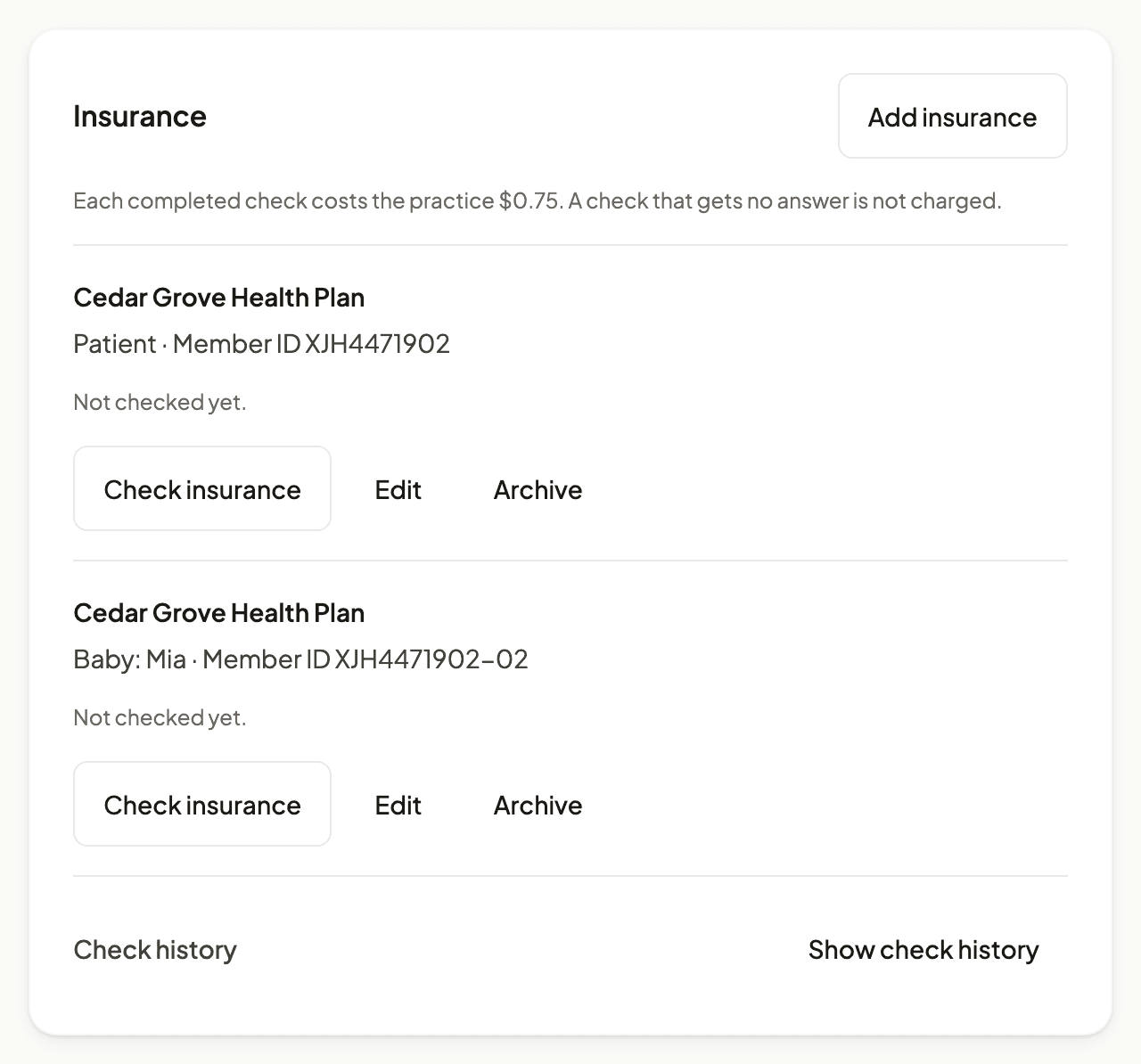
Sample data: the chart Insurance card before a check. View full size. 2. Run the check and read the dated answer
Staff from the chart or booking review. Patients can also check in the portal
The answer is saved on the chart with the date it applies to, any plan dates and benefit lines the insurer reported, and a note when the visit date changed afterwards.
An active plan does not confirm that this provider or this visit is covered, or what the Patient will owe. Confirm missing details by phone or through the insurer’s portal. Each completed check costs $0.75, including an inactive answer.
Next: The check history keeps every answer, who started it and what it cost.
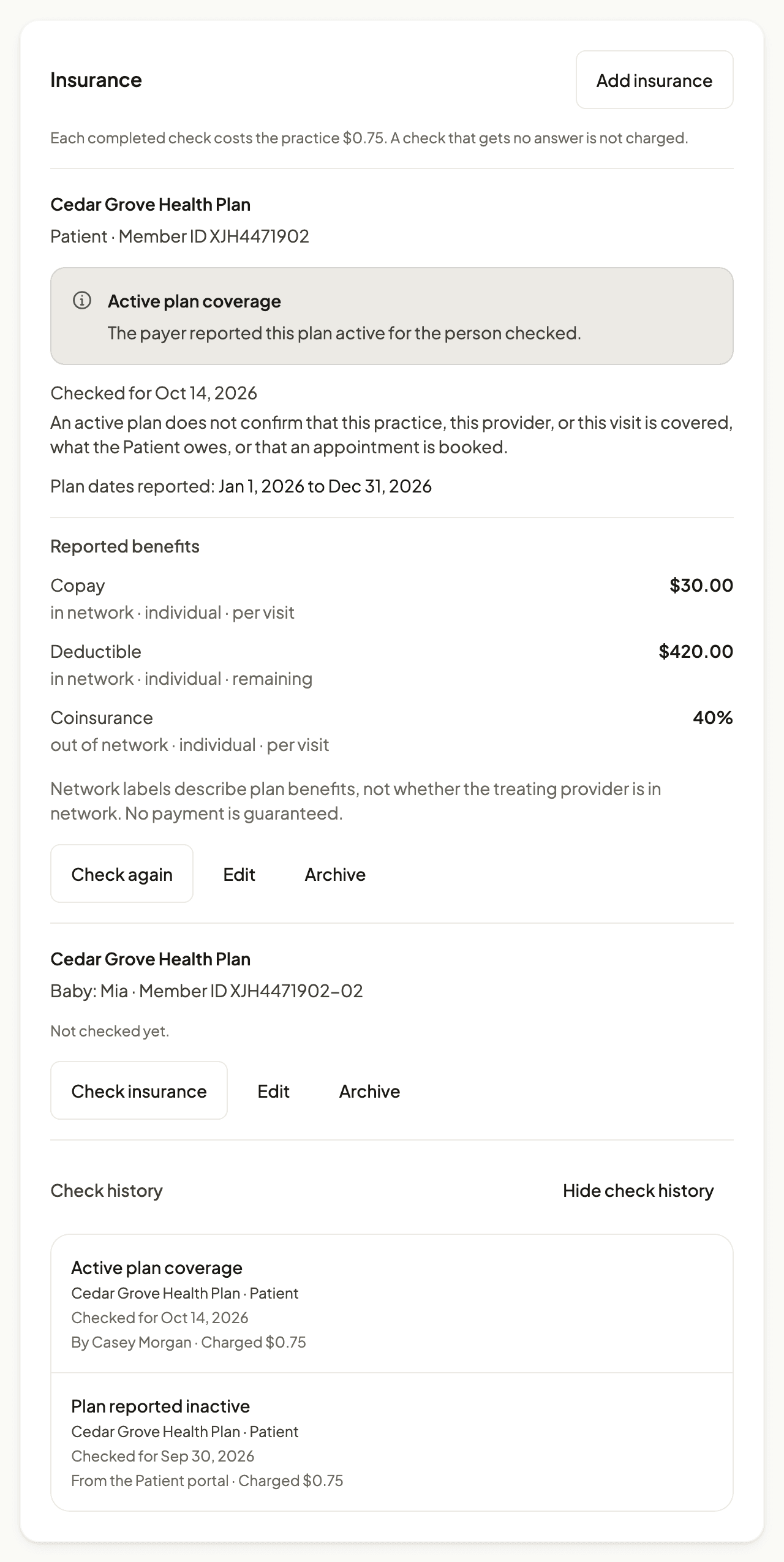
Sample data: a dated answer and the check history for one Patient. View full size.
Prepare, approve and send a claim
A claim starts from a finalized superbill. Two approvals happen separately: the rendering provider approves the clinical content, then an owner, admin or billing team member approves sending. A solo owner who is the rendering provider can give both approvals.
1. Start from the finalized superbill
Staff preparing the claim
Choose the policy, Primary or Secondary, and the saved check that supports the claim. If no check was run, say so. Preview the claim before saving it.
NuBloom supports primary and secondary professional claims. It does not support tertiary claims or produce CMS-1500 or UB-04 forms.
Next: The preview shows what the claim will contain.
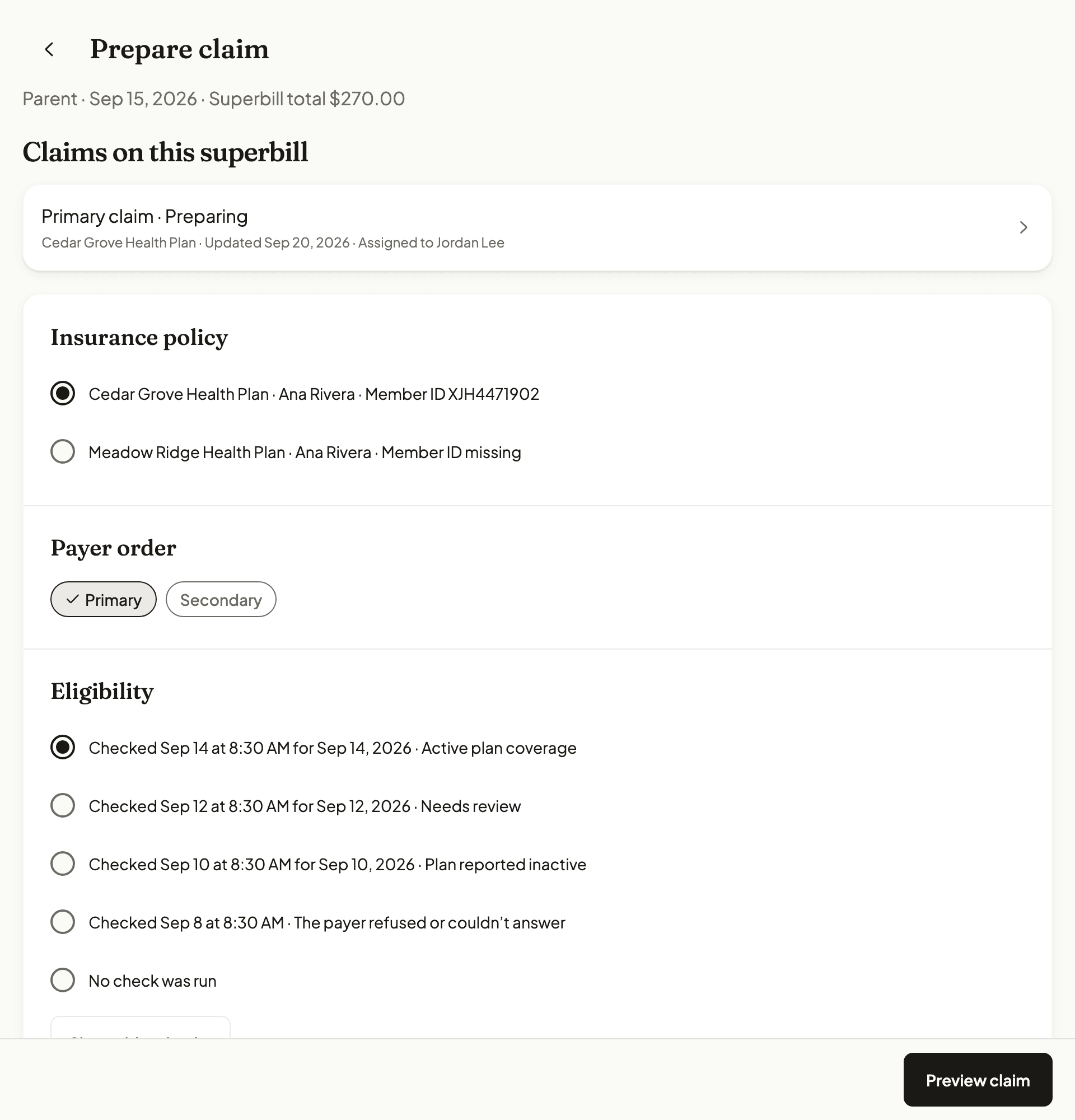
Sample data: choosing the policy, payer order and eligibility record. View full size. 2. Check the preview and save it for review
Staff preparing the claim
The preview lists the payer, covered person, diagnoses, service lines and totals from the superbill. Supply lines without a code, date or place of service are listed as not included.
Reviewers see any unresolved items on the saved claim.
Next: Saving sends the claim to the rendering provider for clinical review. Nothing is sent to a payer.
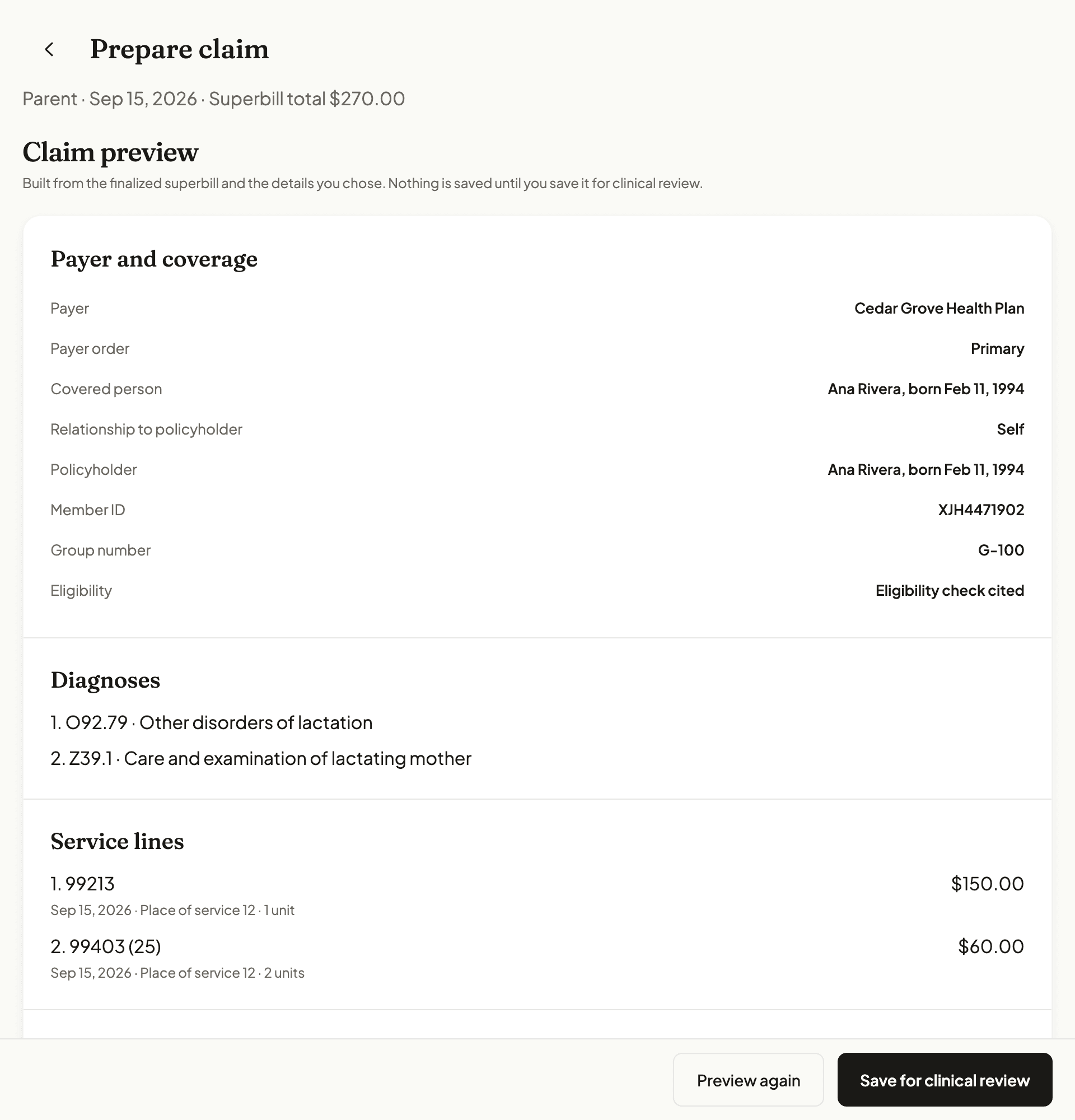
Sample data: the claim preview before it is saved. View full size. 3. Clinical approval
The rendering provider
The provider confirms the diagnoses, services, dates and units match the care they gave. The approval is recorded for that saved version of the claim.
Next: The claim waits for send approval. Clinical approval sends nothing.
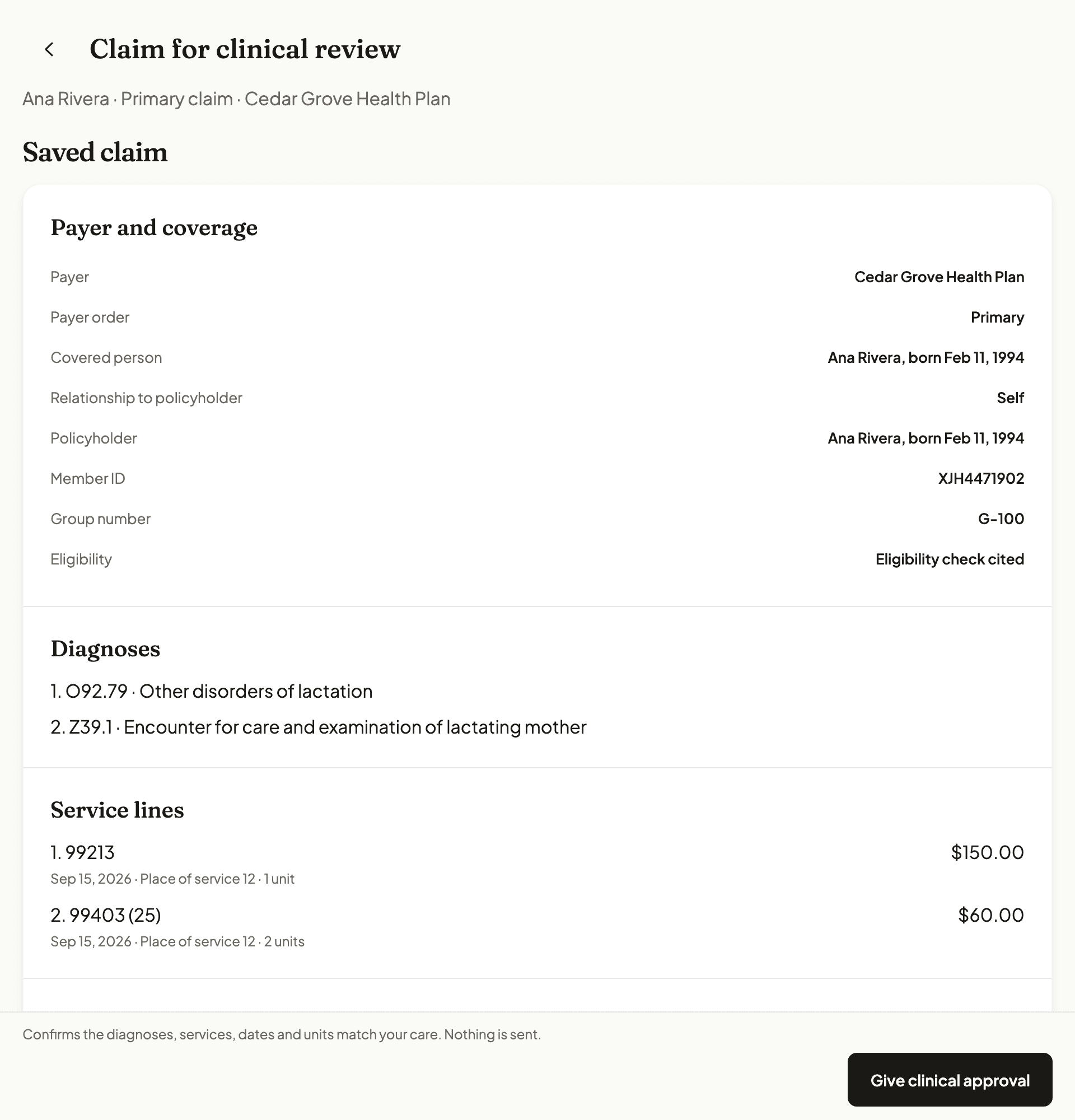
Sample data: the rendering provider’s clinical review. View full size. 4. Approve sending
An owner, admin or billing team member
Staff enter the remaining claim details and review the Patient’s assignment of benefits and release of information. The rendering provider declares their own signature on file.
Send approval covers that exact claim file. It cannot change after approval. The fee is $1.25 only if the clearinghouse accepts the claim. Resending the same claim is not charged again.
Next: Filing status shows what happened when NuBloom files your approved claim through the clearinghouse.
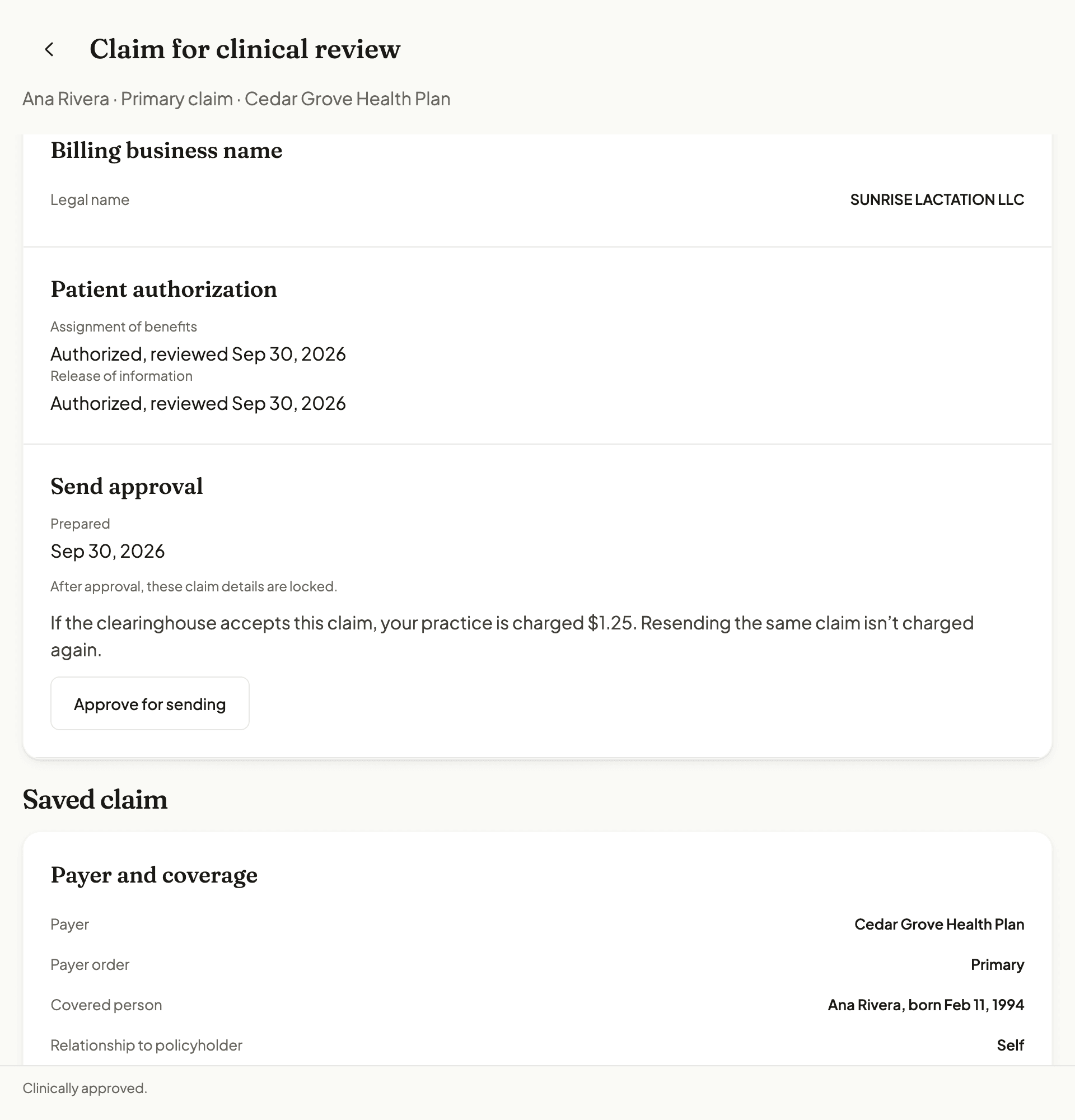
Sample data: billing staff approve sending one claim file. View full size.
Track responses and follow up
After a claim is sent, acknowledgments, status answers and remittances come back separately. None of them counts as money received.
1. Filing status and payer status requests
Billing staff
Filing status shows whether the clearinghouse and payer acknowledged the claim, or rejected it for correction.
Staff can ask the payer where a sent claim stands. The answer is saved with its date. It is what the payer reported at that moment, not a payment.
Next: If a payer does not answer electronically, NuBloom opens a follow-up for a phone or portal check.
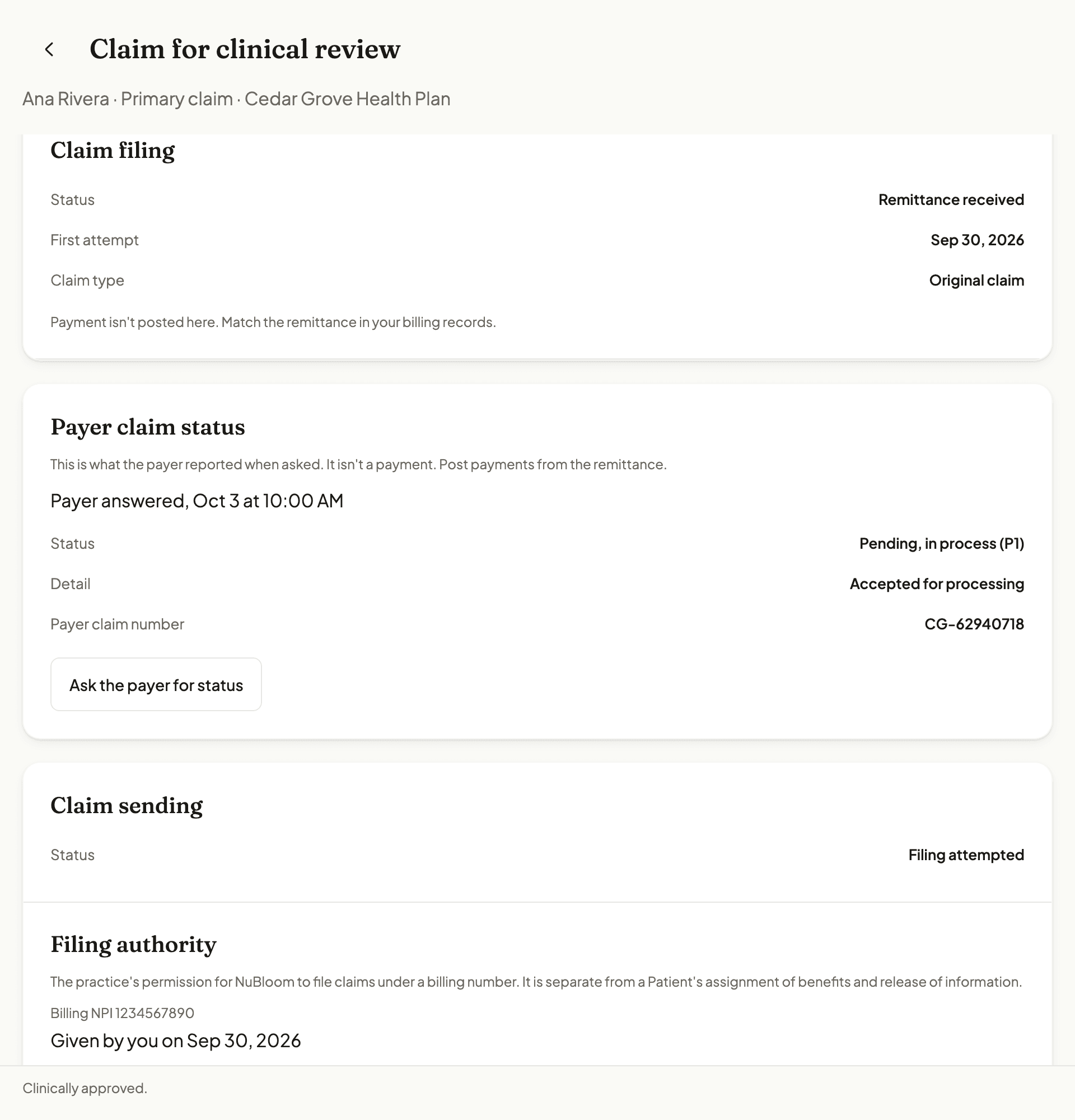
Sample data: filing status and a payer status answer. View full size. 2. Read the remittance and post it
An owner, admin or billing team member
When the payer sends an ERA (electronic remittance advice), the claim shows what was billed, what the payer reports paying, the Patient’s responsibility and each adjustment.
Posting an ERA records the payer’s figures. NuBloom counts money as received only when a recorded payer deposit is matched to it.
Next: The Patient’s share then shows under Patient balance after insurance on the same claim.
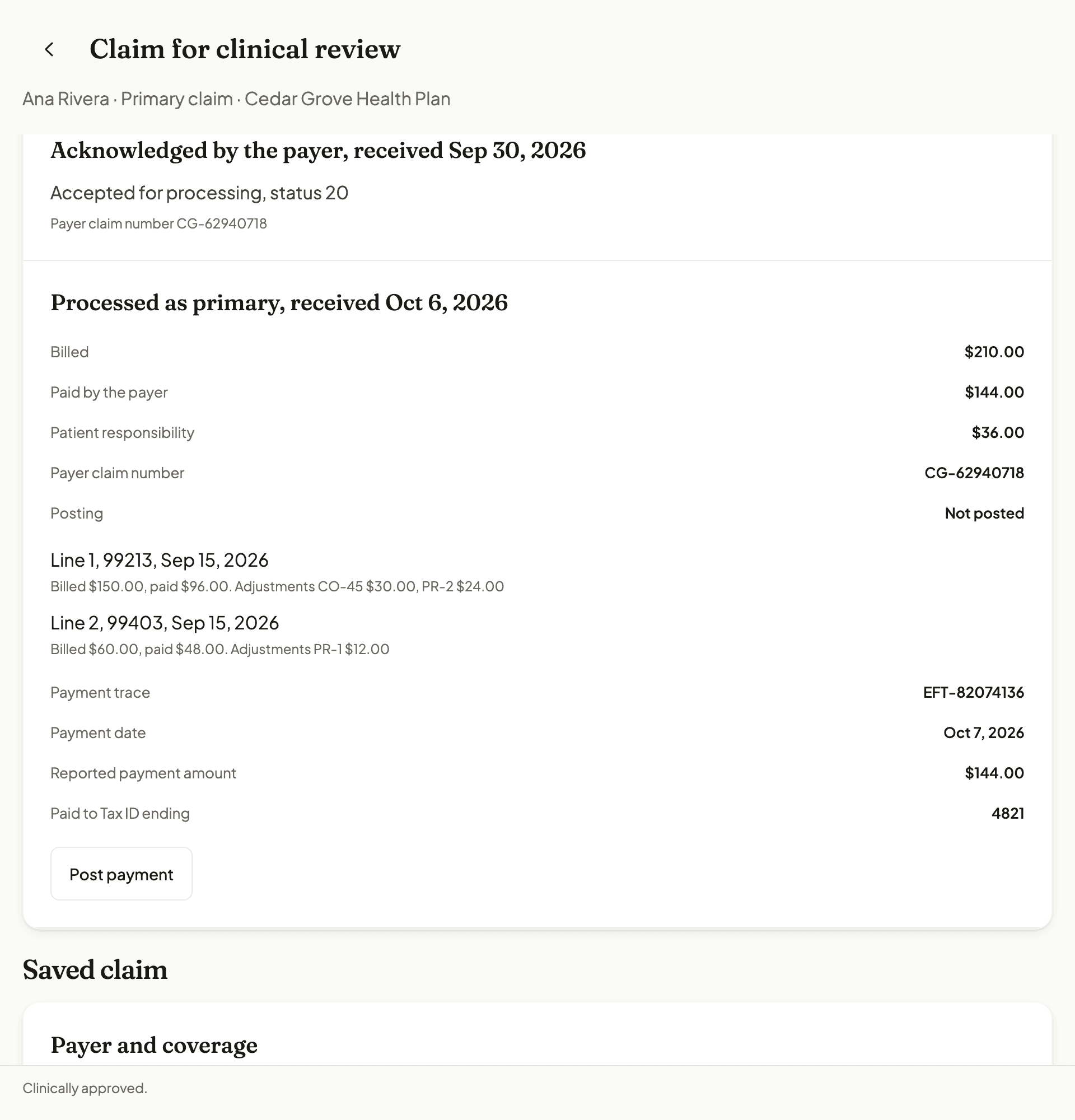
Sample data: a payer acknowledgment and remittance, not yet posted. View full size.
What claim filing costs
- Insurance checks and claim sending need an active paid NuBloom subscription. They are not part of the 14-day free trial.
- $0.75 for each completed check. No checks are included in a plan. Each person is checked separately. Checking both a parent and baby is two checks. An owner or admin accepts the insurance-check terms, turns on billing for checks and sets a monthly spending limit.
- Not every insurer can be checked for every practice. Readiness depends on the insurer, your NPI and any registration the insurer requires. Settings show what is missing.
- $1.25 for each claim the clearinghouse accepts for processing. Acknowledgments, claim status follow-up and ERA (electronic remittance) handling are included. An owner or admin accepts the claim filing terms, turns on claim filing billing and sets a monthly limit.
- Usage is billed monthly, separately from your plan. A payer denial or zero payment does not refund the claim fee.
Full pricing: insurance checks and claim filing.
Other ways to bill
Claims you file somewhere else can be tracked by hand in NuBloom. Manual tracking is included in the plan and sends nothing.
Families who file their own claims can get a superbill from the finalized visit.
Compare software, clearinghouses, networks and billing services
Common questions
- What does Stedi do for my practice in NuBloom?
- Stedi connects NuBloom to supported insurers so your team can send approved claims and attachments, receive payer responses and payment reports (ERA), and request claim status checks. NuBloom puts that work alongside your clinical and billing records. Your team still reviews claims and follows up on denials.
- Can a solo provider or group practice sign up?
- Yes. NuBloom supports individual (Type 1) and group (Type 2) billing NPIs. An owner or admin can add the billing identity and request payer setup in the app. Sending claims requires an active paid subscription, filing authority and a supported payer; some payers require enrollment approval first.
- Does NuBloom handle electronic billing enrollment?
- Yes. You request electronic billing setup in NuBloom. NuBloom checks support, submits the enrollment through Stedi when required and tracks the result. Your team completes any forms, signatures or other tasks the payer asks for. Claims, payment reports (ERA), claim status checks and attachments can each need their own approval. This setup does not apply for a network contract.
- Does signing up make me in network?
- No. The insurer must approve your qualifications and network contract. That decision depends on your provider type, state and the specific network. NuBloom helps you bill insurance and track your applications and confirmed network participation; signing up does not grant a contract.
- How do I apply to become in network?
- First ask the insurer whether it accepts your provider type in your state and the network you want to join, and whether applications are open. Apply directly or use a credentialing service to help gather documents, maintain the requested provider profile, submit applications and follow up. Confirm the approved providers and contract effective date with the insurer. You can record your progress in NuBloom’s Insurance networks settings; NuBloom does not submit credentialing applications or negotiate contracts.
- Can I bill insurance if I am out of network?
- Some plans accept out-of-network claims. Confirm the payer’s rules for the provider, services and plan before filing. NuBloom’s electronic filing still requires a supported payer, a ready billing NPI and filing authority. You can also give the family a superbill to submit for reimbursement.
- Who sends insurance payments to my practice?
- The insurer sends funds through the direct deposit or check arrangement you set up with it. NuBloom receives payment reports and lets your team record and match received deposits. NuBloom does not collect and forward insurer payouts. If a lactation network bills a visit under its own arrangement, confirm how that network pays your practice and track the claim as filed elsewhere.
- Do I have to run an insurance check before sending a claim?
- No. A check is optional. When you prepare a claim you can cite a saved check or record that no check was run.
- Does an active insurance check mean the visit is covered?
- No. It means the insurer reported the plan active for that person on that date. It does not confirm that your provider or the lactation visit is covered, or what the Patient will owe.
- How much do insurance checks cost?
- $0.75 for each completed check. No checks are included in a plan. A completed check returns active or inactive coverage. An inactive answer counts too. Failed checks, reused results and duplicate requests are not charged. Each person is checked separately. Checking both a parent and baby is two checks.
- Does clinical approval send the claim?
- No. Clinical approval confirms the claim matches the care and sends nothing. An owner, admin or billing team member then approves sending that exact claim file.
- How much does it cost to send a claim?
- $1.25 for each claim the clearinghouse accepts. Drafts, rejected claims, claims filed elsewhere and resends of the same claim are not charged. A later denial or zero payment does not refund the fee.
- Is an ERA the same as being paid?
- No. An ERA is the payer’s report of what it paid and why. NuBloom counts money as received only when a recorded payer deposit is matched to it.
- Can I try insurance features during the free trial?
- No. Insurance checks and sending claims need an active paid subscription, so they are not part of the 14-day trial.
The free trial does not include insurance checks or sending claims.
See if it fits how you work
Try NuBloom free for 14 days. Setup takes a few minutes, and you can bring your own templates or use ours. No credit card needed.
Want to talk to the founder first? Book a call